Catégorie : Code

  • [Drupal] Create an event subscriber

    Instructions

    I will be creating a dedicated module using Drupal Console for this event subscriber. But feel free to use your own if you already have one! (don’t forget to backup)

    1. Access the drupal root folder in command line.
    2. Generate a new module:
    3. Generate the event subscriber. We will subscribe to the kernel.request event:
    4. Current state:
    5. Install the module using either drupal module:install or drush pm-enable:
    6. Now, refresh your web page and on each request received server side, a message will tell you the event occurred!

    Additional Information

    • Instructions made on Drupal 8.2.x.
    • Using Drupal Console, you can easily inject services such as the current_user one by answering yes when it asks if you want to load services from the container. Please check this article about service dependency injection: [Drupal] Service dependency injection in a service type class.
    • After editing your files, remember to run a cache rebuild either with drupal cache:rebuild or drush cache-rebuild.
    • Events documentation entry point: Events on Drupal 8. You will find a few core events here.
    • The callback function’s name can be changed to whatever you want.
  • [Drupal] Service dependency injection in a service type class

    The code

    Additional Information

  • [Drupal] Service dependency injection in a plugin type class

    The code

    Additional Information

    • Unlike service type class service dependency injection, there may be no need to implement an interface to be able to load the needed services, such as extending from ControllerBase. So if you are extending from a class which already has the dependency injection implementation, you can just override the create and __construct methods. Don’t forget to call parent methods if needed.
    • Think of the create method as the model used by the __construct of your class.
    • The create signature needs to respect the one of the implemented interface (use your IDE to check against the original declaration).
    • Originally made and tested on Drupal 8.2.x.
    • A convenient list of core services can be found here: https://api.drupal.org/api/drupal/core%21core.services.yml/8.2.x (don’t forget to select the Drupal version if you are not on 8.2.x).
    • Some classes such as ones extending BlockBase will need to implement interfaces to access this pattern:
  • Mini point sur ma carrière

    J’ai quitté volontiers l’industrie du jeu vidéo, ayant perdu toute motivation d’y travailler. L’entreprise dans laquelle j’avais passé plus de quatre ans à essayer de produire des jeux et des applications est sur le point de fermer définitivement. Un chapitre de ma vie est en train de se clore, j’imagine.

    Avais-je dit que j’étais rentré en France il y a quelques mois ? Bon, ben c’est fait. J’avais la tête tellement dans le cul que j’ai oublié de le mentionner. Je n’ai rien trouvé de pertinent sur Montréal hormis des éventuels boulots de testeur dans le jeu et l’applicatif. Pour un game designer et développeur, ce n’est pas très sérieux et j’ai écouté les conseils de proches m’invitant à arrêter l’expérience.

    Avec le recul, je pense pouvoir dire que se dédier aux jeux vidéo, dans l’état actuel du monde, c’est le mode difficile des carrières. J’ai côtoyé de nombreuses personnalités, des personnes sympathiques et ouvertes, et leurs contraires menteurs ou indolents. Mais surtout, j’y ai vu de la précarité. La mienne déjà, et surtout les autres et la pléthore de témoignages trouvables sur la toile. Et le temps qui défile, inlassablement.

    Durant ce parcours du combattant, j’ai utilisé de nombreuses techniques et outils de développement :

    • développement logiciel : Virtools 5, Unity en UnityScript puis en C#, un coup de Java sur Android, Cocos2D-x en C++
    • art : Illustrator, Photoshop, Premiere Pro, After Effects, Blender, FLStudio
    • sites web : HTML5, PHP5 (OOP uniquement), CSS, LESS, un soupçon de Javascript et de jQuery, un chouilla de SQL, quelques notions d’Apache
    • IDE : Visual Studio, Xcode, Eclipse, Android Studio
    • outils divers : SVN, Git, Mercurial, SourceTree, JIRA, VirtualBox, 5 navigateurs desktop, 2 navigateurs mobiles

    Une bonne partie d’entre eux appris en autodidaxie, par passion comme on pourrait le dire. Mais apparemment, cela ne suffit pas à convaincre lorsque j’avais voulu rentrer dans le rang après une longue période en indépendance. Trop généraliste ? Pas d’expérience ? Des entretiens foireux ? Les raisons m’empêchant de retourner à l’emploi dans ce secteur sont nombreuses et je n’ai pas le temps ni l’envie de les énumérer ici. Par contre, je n’ai pas vraiment essayé de tirer profit de mon réseau professionnel. Bien que réduit, il aurait pu aboutir à quelque chose, mais encore une fois, il s’agit de probabilités. Je suis du genre à vouloir expérimenter par moi-même, me prouver que je peux convaincre grâce à ce que j’ai fait par le passé, sans utiliser d’artifices. Et force est de constater que c’est un beau fail.

    Et ensuite ?

    Je reste intéressé par le jeu vidéo, mais de manière plus diffuse et personnelle ; ayant toujours des projets en cours et aimant réfléchir à des designs. Mais le travail en équipe, c’est terminé.

    À partir d’aujourd’hui, je vais commencer à écrire des articles à propos de Drupal, l’outil qui va être dans quelques semaines mon principal centre d’intérêt technologique ! En effet, j’ai rejoint une formation de type Préparation Opérationnelle à l’Emploi Individuelle grâce à Pôle Emploi dans un organisme de formation qui s’appelle Trained People. Moi qui pensais ne plus vouloir y remettre les pieds chez Pôle Emploi, décidément.

    L’écosystème Drupal est si différent de celui des outils du jeu vidéo. Déjà, l’approche open source m’a toujours attiré. Je me rends bien compte à quel point le jeu vidéo est un milieu basé sur le secret, où chacun veut protéger sa petite idée de peur de se faire voler l’idée du siècle. Bien sûr, tout n’est pas parfait, notamment sur Drupal et sa documentation imbuvable. Mais voir un tel effort collectif pour faire fonctionner des milliers de modules contribués gratuitement, ça reste un point qui me donne envie de mettre la main à la pâte.

    Étrangement, malgré une expérience bien foireuse ici en intérim juste avant, tout se passe à merveille depuis décembre 2016, c’est-à-dire dès que je suis entré dans le processus de recrutement de la formation.

  • Unity3D.tips[2]: Intersection point between two lines in 2D

    The code

    The maths behind

    To get the point where two lines intersect, we will do some maths. To the mathematicians who will come across this post, I’m truly sorry for the heart attacks or strokes you may experience by reading this post.

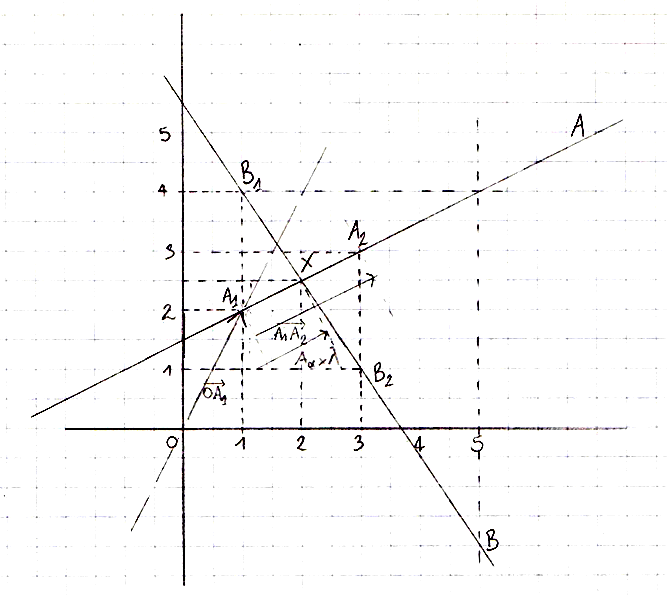
    Ok, let’s take a look on the figure:

    Study case. We can see two lines crossing in an 2D Euclidian space.
    Figure 1

    First, sorry, I was too lazy to make a proper figure using computer tools so I just put a scan. XD

    Next, here are the definitions:

    • AA & BB: the two lines,
    • A1A_1, B1B_1: the arbitrary starting points of the two lines,
    • A2A_2, B2B_2: the arbitrary points which tells the direction of the two lines,
    • XX: the intersection point,
    • OO: the origin point.

    Kewl. Now, what we want is the intersection point XX between those two lines. In other words, we want to know the position which starts from either lines’ arbitrary starting point, added by the direction of the line multiplied by a scalar value. So in our figure 1, the XX position is:

    • the A1A_1 position added by the components of A1A2\overrightarrow{A_1A_2} multiplied by an unknown which I named λ\lambda
    • the B1B_1 position added by the components of B1B2\overrightarrow{B_1B_2} multiplied by an unknown which I named μ\mu

    In this case, it is clear that λ=μ=0.5\lambda = \mu = 0.5 so it will be easy to check if our final formula is correct. 🙂

    At the point of intersection, we know that:

    OX=OA1+λ×A1A2andOX=OB1+μ×B1B2\begin{array}{rcl} \overrightarrow{OX} = \overrightarrow{OA_1} + \lambda\times\overrightarrow{A_1A_2} & and & \overrightarrow{OX} = \overrightarrow{OB_1} + \mu\times\overrightarrow{B_1B_2} \end{array}

    … which gives us:

    OA1+λ×A1A2=OB1+μ×B1B2OA1OB1=μ×B1B2λ×A1A2\begin{array}{rcl} \overrightarrow{OA_1} + \lambda\times\overrightarrow{A_1A_2} & = & \overrightarrow{OB_1} + \mu\times\overrightarrow{B_1B_2} \\ \overrightarrow{OA_1} – \overrightarrow{OB_1} & = & \mu\times\overrightarrow{B_1B_2} – \lambda\times\overrightarrow{A_1A_2} \end{array}

    But we can’t use this statement exactly like this to solve our equation as we cannot multiply and divide vectors in this raw format. Also we need to reduce the unkowns count to 1. So we will separate our equation into two equations with the magic of matrices (which I don’t understand well at the moment), one for the x component and one for the y:

    {OA1xOB1x=μ×B1B2xλ×A1A2xOA1yOB1y=μ×B1B2yλ×A1A2y\left\{\begin{array}{c}\overrightarrow{OA_1}_x – \overrightarrow{OB_1}_x = \mu\times\overrightarrow{B_1B_2}_x – \lambda\times\overrightarrow{A_1A_2}_x \\ \overrightarrow{OA_1}_y – \overrightarrow{OB_1}_y = \mu\times\overrightarrow{B_1B_2}_y – \lambda\times\overrightarrow{A_1A_2}_y \end{array}\right.

    To make our equation more readable, we will use some shorthands:

    Aα=A1A2,Bα=B1B2,C=OA1OB1\begin{array}{r}A_\alpha = \overrightarrow{A_1A_2}, & B_\alpha = \overrightarrow{B_1B_2}, & C = \overrightarrow{OA_1} – \overrightarrow{OB_1}\end{array}

    … so:

    {Cx=μBαxλAαxCy=μBαyλAαy\left\{\begin{array}{c} C_x = \mu B_{\alpha x} – \lambda A_{\alpha x} \\ C_y = \mu B_{\alpha y} – \lambda A_{\alpha y} \end{array}\right.

    From this point, we can reduce the unknown count. In my case, I have chosen to keep μ\mu instead of λ\lambda:

    {CxAαy=μBαxAαyλAαxAαyCyAαx=μBαyAαxλAαyAαx\left\{\begin{array}{c} C_x A_{\alpha y} = \mu B_{\alpha x} A_{\alpha y} – \lambda A_{\alpha x} A_{\alpha y} \\ C_y A_{\alpha x} = \mu B_{\alpha y} A_{\alpha x} – \lambda A_{\alpha y} A_{\alpha x} \end{array}\right.
    CxAαyCyAαx=μBαxAαyλAαxAαy(μBαyAαxλAαyAαx)CxAαyCyAαx=μBαxAαyλAαxAαyμBαyAαx+λAαyAαxCxAαyCyAαx=μBαxAαyμBαyAαxCxAαyCyAαx=μ(BαxAαyBαyAαx)μ=CxAαyCyAαxBαxAαyBαyAαx\begin{array}{rcl} C_x A_{\alpha y} – C_y A_{\alpha x} & = & \mu B_{\alpha x} A_{\alpha y} – \lambda A_{\alpha x} A_{\alpha y} – (\mu B_{\alpha y} A_{\alpha x} – \lambda A_{\alpha y} A_{\alpha x}) \\ C_x A_{\alpha y} – C_y A_{\alpha x} & = & \mu B_{\alpha x} A_{\alpha y} – \lambda A_{\alpha x} A_{\alpha y} – \mu B_{\alpha y} A_{\alpha x} + \lambda A_{\alpha y} A_{\alpha x} \\ C_x A_{\alpha y} – C_y A_{\alpha x} & = & \mu B_{\alpha x} A_{\alpha y} – \mu B_{\alpha y} A_{\alpha x} \\ C_x A_{\alpha y} – C_y A_{\alpha x} & = & \mu (B_{\alpha x} A_{\alpha y} – B_{\alpha y} A_{\alpha x}) \\ \mu & = & \frac{C_x A_{\alpha y} – C_y A_{\alpha x}}{B_{\alpha x} A_{\alpha y} – B_{\alpha y} A_{\alpha x}} \end{array}

    And finally, you have to check if BαxAαyBαyAαx=0B_{\alpha x} A_{\alpha y} – B_{\alpha y} A_{\alpha x} = 0. This will happen if your two lines are parallel or if there is one line defined as a point such as A1=A2A_1 = A_2 or B1=B2B_1 = B_2; no solution exists in those cases.

    Test 1

    Kewl! Now let’s try it with the Figure 1:

    μ=(11)×1(24)×22×1(3)×2μ=48=0.5\begin{array}{rcl} \mu & = & \frac{(1 – 1) \times 1 – (2 – 4) \times 2}{2 \times 1 – (-3) \times 2} \\ \mu & = & \frac{4}{8} = 0.5 \end{array}

    We can get the XX position:

    {OXx=OB1x+Bαx×μ=1+2×0.5=2OXy=OB1y+Bαy×μ=4+(3)×0.5=2.5\left\{\begin{array}{l} \overrightarrow{OX}_x = \overrightarrow{OB_1}_x + B_{\alpha x} \times \mu = 1 + 2 \times 0.5 = 2 \\ \overrightarrow{OX}_y = \overrightarrow{OB_1}_y + B_{\alpha y} \times \mu = 4 + (-3) \times 0.5 = 2.5 \end{array}\right.

    Test 2

    Ok done! Now let’s try with another figure:

    Study case 2. We can see two lines crossing in an 2D Euclidian space.
    Figure 2
    μ=((2)2)×(1)((2)(3))×0(1.5)×(1)1.5×0μ=41.52.666\begin{array}{rcl} \mu & = & \frac{((-2) – 2) \times (-1) – ((-2) – (-3)) \times 0}{(-1.5) \times (-1) – 1.5 \times 0} \\ \mu & = & \frac{4}{1.5} \approx 2.666 \end{array}

    We can get the XX position:

    {OXx=OB1x+Bαx×μ=2+(1.5)×2.666=2OXy=OB1y+Bαy×μ=(3)+1.5×2.666=1\left\{\begin{array}{l} \overrightarrow{OX}_x = \overrightarrow{OB_1}_x + B_{\alpha x} \times \mu = 2 + (-1.5) \times 2.666 = -2 \\ \overrightarrow{OX}_y = \overrightarrow{OB_1}_y + B_{\alpha y} \times \mu = (-3) + 1.5 \times 2.666 = 1 \end{array}\right.

  • Unity3D.tips[1]: Strategies to prevent the collision when a ball rolls from a planar surface to another

    Method 1: mega box collider

    Use a single BoxCollider for all your planes. For example, if you have multiple aligned planes, remove their Collider component (Box, Mesh, whichever they have) and on only one of the planes, add a BoxCollider and adjust its center and size values in the component’s inspector to encapsulate all the planes.

    Pros

    • Simple.

    Cons

    • Supports only rectangular surfaces.

    Method 2: generated colliders

    If you are rolling your ball on a non rectangular surface, you will need to find a way to generate a mesh collider for all your planes. For this, choose one of the following:

    Pros

    • Just works.

    Cons

    • Uses noticeable CPU power when updating (baking) the colliding mesh in real time. Update sparingly.

    Method 3: ramps as bridges

    Create a set of meshes from a 3D software such as Blender to make invisible ramps which will be placed partly underground between your planes. They have to be large enough to make the transitions as smooth as possible. The height between the top of the bridge and the ground (the planes) should be approximately the value defined by the Default Contact Offset value in the Physics Manager.

    Pros

    • No real improvement.

    Cons

    • The ball may jump a little, especially at high speed.
    • Doesn’t work with small tiling (or when your successive planes are small): the longer the tiles, the longer bridges can be.
    • Requires a lot of testing.
    • Requires 3D software usage.
    • The result is not consistent.
    • Requires good workflow / toolchain.

    Method 4: make custom extended planes’ colliders

    This one should not work very well.

    Create in a 3D software a planar mesh. Then, on its edges, extrude towards outside and lower down slightly the new edges. To put the words into image:

    Photo of speed cushions.
    Credits: Richard Drdul — cc-by-sa-2.0 (original)

    Make them intersect, and hopefully the bouncing will be invisible.

    Pros

    • Quite simple.

    Cons

    • The ball may jump a little, especially at high speed.
    • Requires a lot of testing.
    • Requires 3D software usage.
    • The result is not consistent.
    • Requires good workflow / toolchain.

    Method 5: turn slightly your planes’ colliders

    Make your planes’ colliders slightly rotated so that, in the direction of movement, the end of a collider is slightly above the next plane’s collider. The height should be approximately the value defined by the Default Contact Offset value in the Physics Manager and hopefully no bouncing will occur.

    Pros

    • Works flawlessly.

    Cons

    • You will see the ball flying and falling a few units from one plane to another.

    Method 6: do everything by script

    Maybe the Physics is not what is the best for your gameplay. Write your own system with accelerations, collision detection. This is the old-fashioned way and is the choice of a lot of developers! ^^

    Pros

    • Works flawlessly.
    • Permits game design driven gameplay and not by physics.

    Cons

    • Not using the PhysX forces and gravity.
    • Requires to work (omg! 😉 ) to simulate fake physics.

    Method 7: Make your ball much larger

    By using a greater ball (x10, x100), this could lead to less edge detection.

    Pros

    • May work.

    Cons

    • The scale of the simulation would change: if you make everything at the same scale as the ball, objects falling by gravity will look like they fall in slow motion.
    • The result is not consistent.

    Method 8: collision layers and raycast

    This one is pretty cool.

    1. Keep single BoxColliders for each plane. Set the layer of the plane prefab to SinglePlanes (create the layer).
    2. Make a big Unity cube with a collider which encapsulates all the planes. Set the layer of the cube to ContinuousPlane.
    3. Create two layers: OnAPlane and NotOnAPlane.
    4. Set the ball prefab’s layer to OnAPlane.
    5. In Physics Manager, set the collision matrix so that:
      • NotOnAPlane and ContinuousPlane are not collidable (unchecked),
      • OnAPlane and SinglePlanes are not collidable (unchecked).
    6. On each Update(), do a raycast from the center of the ball towards Vector3.down on the layer SinglePlanes:
    7. If the raycast returns false, the center of the ball is not on a plane. So now, we change the layer of the ball to NotOnAPlane. The ball will start to fall through the hole.
    8. If the raycast returns true, set the layer of the ball to OnAPlane.

    For how to define a layer, please check the manual.

    Pros

    • Works efficiently with dynamic floor layout.
    • You will learn how to deal with layers and Physics.

    Cons

    • No real flaws.

    Additional Information

    • Methods above may be combined.
    • You can adjust the physics project settings and / or set the physics materials to reduce the bounciness of your objects.
    • Make sure the thickness of the planes collision is not 0f. Make them 1f large or more.
    • There is a possibility to reduce the bounces, but I am not recommending it (may cause jittery and physics artifacts): set the Default Contact Offset to 0.0001. Again, I am not recommending it!
    • All of this post could be useless when the default PhysX embedded in Unity will be upgraded.
    • I originally posted this post as an answer on the Unity Answers website but none of the above methods have been considered as valid by the OP. Hence the removal from the answers website.
  • Unity3D.tips[0]: Avoid naming your MonoBehaviour methods Main()

    Try to avoid naming your MonoBehaviour methods Main(). These would be triggered between Awake() and Start(). This Main() method supports IEnumerator flavors as much as Awake() and alike! But as useful as it could be, I would not recommend to use it as there is no official documentation entry in the manual. And usually, you should not need this method.

    Évitez de nommer Main() les méthodes se situant dans vos MonoBehaviour. Celles-ci seraient déclenchées entre Awake() et Start(). Cette méthode Main() supporte la version en IEnumerator autant que Awake() et les autres ! Mais aussi utile que pourrait être cette méthode, je ne la recommanderais pas à l’usage puisqu’il n’existe aucune documentation officielle dans le manuel. Et normalement, vous ne devriez pas avoir recours à cette méthode.

    Screenshot of Unity console
    Awake() is fired, then Main() and finally Start(). But don’t use Main()!

  • [Unity] Force text re-serialization crash : La solution

    Capture d'écran de la fenêtre de crash
    Plantage de l’éditeur Unity sur la re-sérialisation en texte

    Lorsque vous avez un gros projet Unity entre vos mains et que vous décidez de forcer la sérialisation en texte (Project Settings > Editor > Asset Serialization > Mode: Force Text), il se peut que vous rencontriez un problème de mémoire insuffisante qui fait crasher Unity. Lors du processus de « re-serialisation », Unity charge tous vos assets dans la RAM pour recréer les structures de données du format binaire vers le format texte. Puis arrive le moment tant redouté : l’éditeur n’arrive plus à allouer de la mémoire et crashe !

    Ceci est dû pour l’une des deux raisons suivantes :

    1. l’incapacité d’Unity à allouer la mémoire nécessaire due à la limitation des applications 32-bit.
    2. si vous êtes sur Unity 5, bien que l’éditeur soit 64-bit, il n’y a pas assez de mémoire sur votre PC.

    Quel que soit le cas, pas de panique ! Vos données n’ont pas été corrompues par le crash vu que le travail se faisait uniquement en RAM. Néanmoins, il se peut que vos derniers changements apportés au projet se soient évanouis dans la nature (parfois, il faut fermer l’éditeur proprement pour s’assurer que des changements sont sauvegardés sur le disque).

    Comment remédier à ce problème ?

    Pour ma part, la recherche de solution et la résolution m’ont pris un peu plus d’une heure. J’ai passé pas mal de temps sur les forums sans trouver de réelle réponse précise qui n’implique pas le devoir de redéfinir des valeurs et des références qui ont disparu lors de la conversion. Mais de mon côté, j’ai pu trouver une méthode qui permet de faire la conversion sans perte de valeurs et de références !

    Je suis trop fort !

    Voici donc mon pas à pas :

    1. Déjà, partez d’un projet stable, sans erreur. Corrigez vos bugs avant de convertir les assets en texte.
    2. Archivez votre projet quelque part. Ben oui, c’est important d’archiver avant de faire de opérations dangereuses.
    3. Dans l’éditeur, dans la fenêtre Project, sélectionnez tous vos assets puis exportez-les dans un unitypackage via Export Package…
      • L’export peut prendre plusieurs dizaines de secondes, voire minutes, selon la taille du projet (mon package faisait 750 Mo !)
    4. Mettez votre package pas trop loin, on va s’en resservir souvent pendant le processus.
    5. Supprimez tous vos assets dans Project ! Quand je vous disais d’archiver le projet, ce n’était pas pour rien…
    6. Définissez Project Settings > Editor > Asset Serialization > Mode: Force Text
    7. Double-cliquez sur votre unitypackage depuis l’explorateur et attendez le chargement qui peut prendre du temps.
    8. Désélectionnez tout puis sélectionnez uniquement une partie du package pour l’import.
      • Le but est d’importer petit à petit les assets. À chaque import, Unity va re-sérialiser en texte.
      • Si l’import plante (et donc que Unity crash pour out of memory), c’est parce que vous avez pris trop de fichiers d’un coup. Dans ce cas, réimportez à nouveau en prenant moins d’assets.
      • Vous constaterez très probablement que la console vous signale des erreurs pour classe manquante. Dans ce cas, identifiez un asset ou un groupe d’asset qui contient la classe manquante et importez-le. Très important : lorsque vous avez réglé les problèmes de classes manquantes, il faut réimporter tous les assets à partir desquels l’erreur est apparue dans la console, toujours petit à petit (avec les mêmes sélections), qui sont déjà importés pour recréer les variables et les références qui ont pu se briser.
      • Pour vous aider dans le processus, je vous conseille d’avoir la fenêtre du Gestionnaire des tâches pour voir la taille que prend une sélection d’assets en import pour mieux découper les imports.
    9. Une fois que tout est importé, faites un test. Il ne devrait rien manquer si vous avez tout bien importé / réimporté / réréimporté / …
      • Si vous avez des problèmes de NullPointerException ou des incohérences de comportement dans le test, identifiez l’asset qui lève cette exception ou l’incohérence puis réimportez-le. Ne faites surtout pas la réassignation vous-même, le réimport est censé corriger les problèmes de références manquantes (Missing) et les valeurs qui n’ont pas été bien importées.

    Le plus long dans le processus a été, pour moi, d’attendre l’ouverture du unitypackage à chaque import. C’est pourquoi vous devez bien comprendre comment sont rangés vos assets pour bien découper vos imports. Je pense que le mieux est d’importer du plus générique au plus spécifique. Par exemple, importer les scripts des plugins sur lesquels s’appuie votre code, puis petit à petit, importer les prefabs et assets jusqu’à arriver à ceux utilisés dans les scènes. Les scènes doivent d’ailleurs être importés en dernier, il s’agit du bout de la chaîne.

    Voilà, j’espère que ça servira à quelqu’un. De mon côté, ça m’a permis de travailler avec Mercurial.

  • ShellExecuteA n’ouvre pas d’URL sur Windows depuis un logiciel C++

    Je viens de passer trente minutes à chercher la solution à un problème empêchant d’ouvrir le navigateur par défaut sur Windows depuis un logiciel C++ via ShellExecuteA(), en l’occurrence, le jeu Esteren : Les Griffes du Seigneur Sorcier dont le kickstarter est toujours en cours au moment où j’écris cet article. 😛

    La solution dans mon cas a été de redéfinir le navigateur par défaut, par exemple en passant par Chrome puis en revenant à Firefox. Juste avec cette simple manipulation, le ShellExecuteA() a fonctionné de nouveau. C’est tout !

    Et oui, rien à voir avec un bug de votre code, c’est probablement de la faute des autres qui ne font pas bien leur boulot !

  • [C++] Ouvrir le navigateur depuis Cocos2d-x

    Il fallait que j’intègre des boutons dans un projet cocos2d-x pour rediriger sur des pages de réseaux sociaux. Mais à mon grand regret, il n’existe pas de fonction préparée dans le framework de cocos2d-x (version 3.2) pour ouvrir une page de navigateur. Il m’a alors fallu l’implémenter moi-même.

    Content.

    Fort heureusement, des personnes se sont déjà penchées sur la question et une source m’a été particulièrement utile. Pour info, ce qui va suivre pourrait aussi servir à ouvrir des fichiers en local (file://) ou toute ressource pointable par un URI (tant qu’il y a un logiciel qui peut gérer cet URI, of course) ! Mes chers lecteurs francophones (parce qu’aucun anglophone ou autre ne viendrait ici huhu), voici un récapitulatif :

    Partie Windows

    • cocos/platform/win32/CCApplication.h
    • cocos/platform/win32/CCApplication.cpp

    Partie Android

    • cocos/platform/android/CCApplication.h
    • cocos/platform/android/CCApplication.cpp
    • cocos/platform/android/java/src/org/cocos2dx/lib/Cocos2dxActivity.java
      • À ajouter dans les imports si ce n’est pas déjà fait :
      • À ajouter dans la classe Cocos2dxActivity :

    Partie iOS (quand j’en aurai besoin :P)

    Conclusion

    Et voilà ! Désormais, pour ouvrir la page, appelez la méthode openUrl ainsi :